Your wardrobe,
on your form.
Most closet apps file your clothes into a flat grid. Wearform draws a figure from the measurements you enter and arranges your real garments on it — no account, no tracking, and no photos sent to anyone's server.
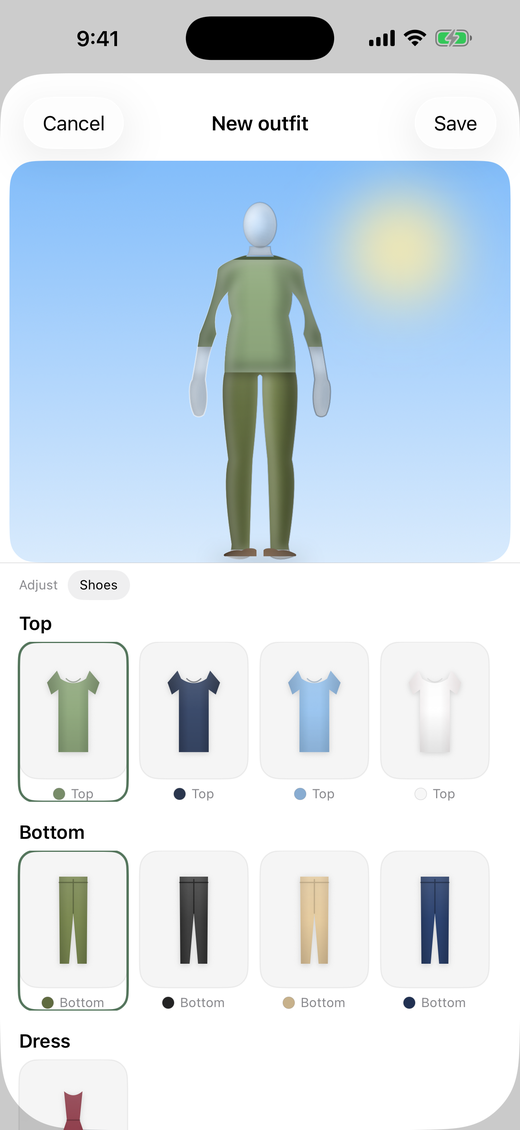
A croquis, not a catalogue.
Designers sketch on a croquis — a plain figure with human proportions — because a garment only makes sense on a body. Most wardrobe apps stop at the flat grid. Wearform puts the outfit on a figure you've shaped.
Built from your numbers
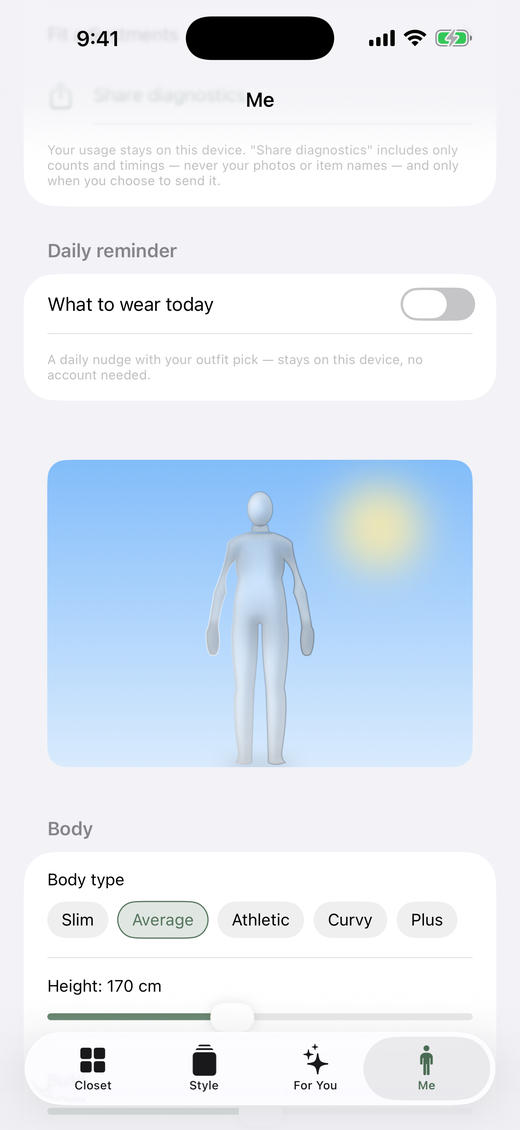
Pick a body type — slim, average, athletic, curvy, plus — then set height, build, shoulders, hips, arm and leg length. The figure is redrawn from those values.
Placement follows the shape
Garment placement and outline respond to the figure's proportions, so a top sits on your shoulders rather than floating near them. Change the sliders and the clothes move with them.
Nudge anything
Drag or pinch a piece to move and resize it. The placement saves with that outfit, so the same shirt can sit differently in two different looks.
Four steps, then it's just your wardrobe.
Photograph a garment
Shoot it in the app, pick it from Photos, or send it in from anywhere with the iOS share sheet — up to ten images at a time.
The background comes off, on your phone
Apple's Vision framework cuts the garment out on the device. Wearform also makes an editable first guess at the category and the dominant colour. It doesn't identify brands, materials or prices — those are yours to fill in.
Dress the figure
Tap items to fill the slots: top, bottom, dress, outerwear, shoes, hat. Judge the proportion and the colour together, then save the look.
Wear it, log it, plan it
Tap once to log a wear, watch cost per wear update, and let an optional daily reminder tell you what you planned.
Suggestions that show their working.
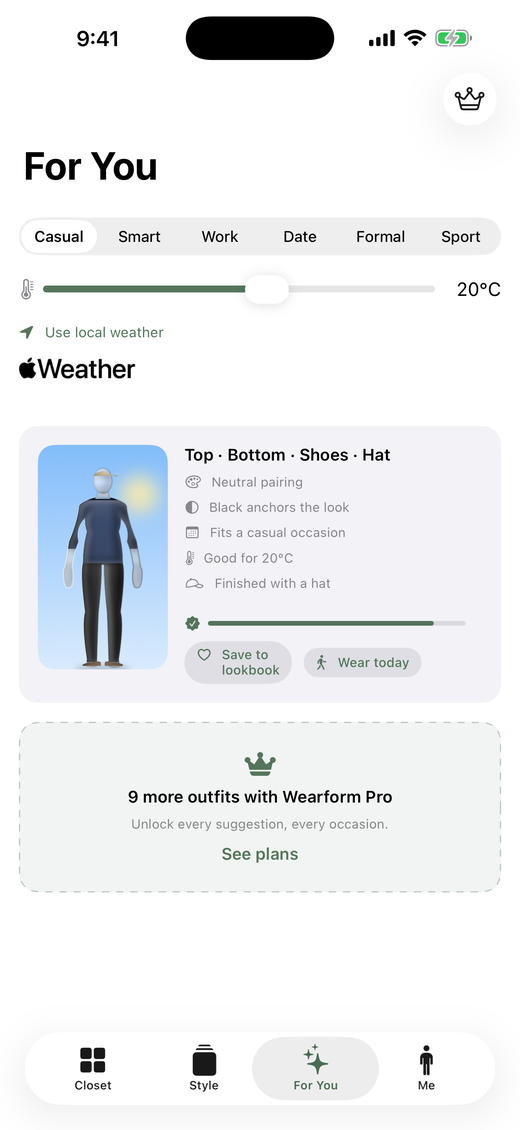
Pick an occasion and Wearform pairs pieces you already own using explicit rules — colour relationships, formality, warmth and the temperature outside. Every suggestion carries the reasons it was made, so you can see the logic and overrule it.
Six occasions
Casual, smart casual, work, date, formal, sport — each with its own formality target.
Today's weather, or any temperature
With your permission and a connection, Wearform asks Apple WeatherKit for local conditions. Decline it and set the temperature by hand instead — the suggestions work the same.
Get more out of what you already own.
Cost per wear
Enter what a piece cost and log wears as you go; Wearform keeps the running cost per wearing so you can see which buys earned their money.
Find anything
Search by name, or filter by colour, season, occasion, or the pieces you've never worn at all.
Plan ahead
Assign saved looks to days on the calendar, and see today's on your Home Screen with the widget. Assigning a day is a Pro feature.
A quiet nudge
An optional daily reminder with your outfit pick. It's a local notification scheduled on your phone — there's no push server involved.
The details
Brand, price, warmth, season, tags and notes per garment, so the closet knows what you know.
Your own numbers
Wear streaks, never-worn counts, wardrobe value — kept on your device and shown only to you.
Stated precisely, not broadly.
Privacy copy is usually vague on purpose. Here is specifically what happens to your data, including the parts that leave the phone.
There is no Wearform server
No developer-operated backend, no account system, no wardrobe database anywhere. The developer does not keep a server-side copy of your closet and has no way to browse it.
Your photos are processed on the phone
Background removal, colour detection and the category guess all run locally through Apple's Vision framework. Your original photo is never sent to a Wearform server or to any outside image service.
If you turn on iCloud sync, the garment image Wearform saved — the cutout, or the photo itself when background removal finds no clear subject — is stored in your own private iCloud database so it can appear on your other devices — your Apple account, using your iCloud storage, not the developer's.
Sync is your private iCloud, and it's optional
Wearform mirrors into your private CloudKit database. Apple states that private-database records are not visible to a developer in the developer portal. Turn iCloud off and the wardrobe simply stays on the one device.
Private sync is not the same as a backup: it depends on your Apple account, your available iCloud storage and Apple's services.
Nothing to opt out of
No Wearform sign-up, no advertising identifier, no third-party analytics SDK, and no App Tracking Transparency prompt — because Wearform does not track you across apps or websites. The App Store privacy label reads Data Not Collected. Apple services you choose to use — iCloud, weather, purchases — still do their own processing.
Usage insights stay on the phone. The optional “Share diagnostics” button sends counts and timings only, never photos or item names, and only when you tap it.
Deleting means deleting
“Delete all my data” in the Me tab removes your garments, outfits, plans, cutout images, body profile, settings and on-device metrics. Because sync mirrors changes, those deletions propagate to your private iCloud copy as well. Deleting the app on its own is not the same thing — use the in-app control if you want the synced records gone.
What Wearform isn't.
Knowing this before you install saves you a download.
| Not this | Because |
|---|---|
| Photoreal try-on on a photo of you | That needs photos of your body on someone's servers, and it invents fabric that isn't there. Wearform uses a drawn figure instead, and never asks for a body photo. |
| A fit or size predictor | The figure compares colour, proportion and layering. It can't tell you whether a medium fits or how a fabric falls. |
| A shop, a feed, or affiliate links | Wearform earns nothing when you buy clothes. It's built around the clothes already in your closet. |
| A social network | No profiles, no followers, no sharing your wardrobe with other users. |
| A body scanner | Proportions come from sliders you set. No camera measurement, no biometrics. |
| Automatic cataloguing | You photograph each piece. Wearform guesses the category and colour; brands, prices and tags are yours to enter. |
| On Android, iPad or the web | Designed for iPhone, iOS 18 or later. There's no Android app, no web app, and no iPad-optimized interface. |
The free version is a real wardrobe app.
Everything below is what the free version includes today. Pro lifts the limit on suggestions and unlocks calendar planning.
| Free | Pro | |
|---|---|---|
| Unlimited garments and outfits | Yes | Yes |
| The figure, set to your proportions | Yes | Yes |
| On-device cutouts | Yes | Yes |
| Wear logging and cost per wear | Yes | Yes |
| Search, filters, tags and notes | Yes | Yes |
| iCloud sync, widget, daily reminder | Yes | Yes |
| Outfit suggestions | One at a time | Every one |
| Assigning outfits to calendar days | View only | Yes |
US pricing: Wearform Pro is $4.99 per month or $29.99 per year as an auto-renewing subscription, or $59.99 as a one-time purchase for the current app. Local prices differ by storefront — your App Store shows the binding price before you buy. Monthly and yearly plans renew automatically through your Apple account until you cancel there; the one-time purchase is not a subscription. Deleting the app does not cancel an active subscription. If you stop paying, nothing you've already added is removed.
Before you install.
Do I have to photograph my whole wardrobe first?
No, and you probably shouldn't. Start with the pieces you actually reach for and add others when you want to use them — one top and one pair of trousers is enough to build an outfit. Wearform can't maintain the closet for you, and it doesn't pretend the cataloguing is effortless.
Is the figure a virtual fitting room?
No. It's a configurable croquis for comparing colour, proportion, layering and placement. It can't tell you whether a size fits, how fabric will drape, or how an outfit will feel to wear. The mirror still has the final say.
Do I need to upload a photo of my body?
Never. Wearform doesn't scan your body or estimate anything from a photo. You pick a body type and move sliders for height, build, shoulders, hips, arm and leg length.
Why not just take mirror photos?
A mirror photo is better for an outfit you've already put on. Wearform is for comparing combinations before you get dressed, against the same figure each time — including the combinations you'd never bother physically trying.
What actually happens to my garment photos?
The original photo is processed on your iPhone to remove the background and is not sent to a Wearform server or any outside image service. If iCloud sync is on, the garment image Wearform saved is stored in your own private iCloud database so it can reach your other devices — that is the cutout, or the photo itself where background removal finds no clear subject.
Can the developer see my closet?
There is no developer-operated account system or wardrobe database to see it with. Synced records live in your private CloudKit database, which Apple states is not visible to developers in the developer portal.
Does it work offline?
The wardrobe, the figure, outfit building, wear logging and the on-device image processing all work from local data with no Wearform server involved. Live weather, iCloud sync, and purchases or restoring them need Apple's services and a connection.
Are the suggestions AI?
No — and it would be easy to claim otherwise. They come from explicit rules over colour, occasion, formality, warmth and temperature, which is exactly why each one can show you its reasons instead of an unexplained score.
How good are the cutouts, really?
Good, not magic. Background removal depends on the photo: one garment, laid flat or hung against a plain contrasting background, with the whole item in frame, gives a clean edge. Busy backgrounds, hard shadows and dark clothes on dark surfaces are where it struggles — usually a second photo fixes it.
Is it accessible with VoiceOver or large text?
Wearform uses standard iOS controls, so much of it behaves correctly by default — but I haven't put this version through a proper accessibility audit, and I'd rather say that than imply a level of support I haven't verified. If you depend on VoiceOver, larger text, increased contrast or reduced motion, email me before you download and I'll tell you honestly where the current build stands.
Can I export my data?
Not yet. There is an in-app “Delete all my data” control, but no full wardrobe export today, so please don't treat iCloud sync as a substitute for one. If an export matters to you, say so by email — it's the kind of request that moves up the list.
Why does a wardrobe app want my location?
Only to ask Apple WeatherKit what the weather is where you are, and only if you allow it. Decline and the temperature slider does the same job by hand.
What happens to my wardrobe if you stop maintaining the app?
Your closet doesn't depend on a Wearform backend, so there's no server that can be switched off underneath it, and synced data sits in your own Apple account. What no independent developer can promise is indefinite iOS compatibility, App Store availability or support — that's worth weighing honestly before you rely on any one-person app.
Why are there no reviews yet?
Wearform launched on 11 August 2026 and hasn't collected public ratings yet. It's an early app from one developer. The free version, the boundaries listed on this page, and a direct line to that developer are the evidence available today.
Who helps me when something breaks?
One person, by email: yyyyy.yeyuhe@gmail.com. There's no support desk and no guaranteed response time, but bug reports from early users genuinely set the order of the next release.
Where is it available, and in what languages?
The App Store in most regions — not mainland China — in English, Japanese and Simplified Chinese.
See what you already own.
On a figure with your proportions, on a phone that keeps it to itself.